Project
Mac Transformer
A macOS menu-bar app that turns documents into PDF, plain text, spoken audio, and AI summaries through a pluggable pipeline — and can publish the results to Books, Music, Reading List, Obsidian, or Notion.
I wanted one place to drop a document and get back the forms I actually use: a PDF, clean text, an audiobook-style recording, and a summary. Mac Transformer does that through a pipeline of converters and sinks that plugins can extend without recompiling.
What it does
-
Converts docx, doc, rtf, pptx, ppt, odt, xlsx, pdf, Markdown, AsciiDoc, reStructuredText, Org, HTML, and text — and anything else a locally installed converter understands.
-
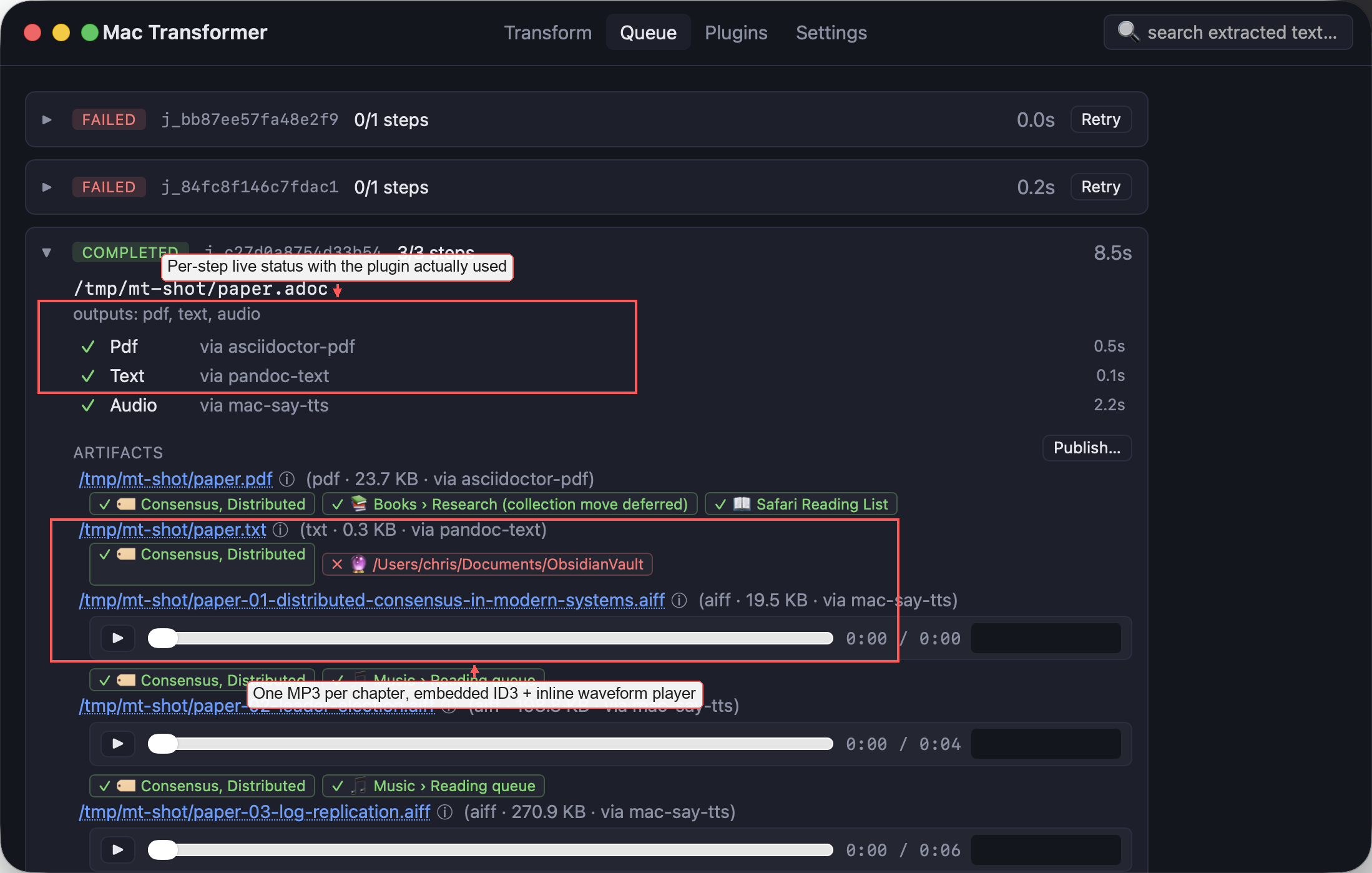
Produces PDF (Word, LibreOffice, Pandoc, or asciidoctor-pdf), text (Pandoc, Word, or pdftotext, with OCR for scanned PDFs via macOS Vision), chapter-split audio with ID3 tags and cover art (via my local Kokoro TTS runtime or macOS
say), and AI summaries via any OpenAI-compatible endpoint. -
Publishes to Apple Books, Apple Music, Safari Reading List, Obsidian, Notion, and Finder tags.
-
Watch folders, saved recipes, duplicate detection, retry of a failed step, and jobs that survive restarts.